Multitenant Android, iOS, and Web platform CI/CD
How Platfio turns agency-owned customer apps into repeatable web, Android, and iOS releases without hiding the messy parts of deployment.
 Web
Web  Android
  iOS
iOS  Ionic
Ionic  Capacitor
  Android Studio
  Fastlane
  Google Cloud
  Terraform
  Firebase
  Xcode
Xcode  App Store
  Play Store
 Platfio, previously AxipApp, had to treat deployment as product infrastructure because the normal CI/CD shape did not fit the business.
Most off-the-shelf systems we looked at assumed a clean, familiar structure: one project, one set of accounts, one deployment pipeline. That works if you are shipping a single product or a small collection of internal services.
It breaks down when the product is an app development platform.
Platfio needed to onboard consultancies, store accounts, customer apps, and release targets without every new app becoming another expensive, hand-managed CI/CD island. Pricing mattered, but structure mattered more. If the platform forced a one-project-per-app model, the operating cost and administrative weight would scale in exactly the wrong direction.
The product model was multitenant, but not in the simple SaaS sense where every customer shares the same web application. Agencies managed businesses. Businesses owned apps. Each app could become a branded web app, Android app, and iOS app, with its own assets, environment values, release state, store records, credentials, and compatibility constraints.
So the deployment system had to model the real ownership graph instead of pretending every app was a standalone software project.
I was the principal engineer on this deployment system, working with a small engineering team to turn that ownership graph into runners, build records, artifacts, logs, manual handoff paths, and release controls that could survive platform scale.
The operating pressure
The deployment system had to operate at platform scale. The pressure was not just “run a pipeline”; it was to preserve ownership, evidence, compatibility, and recovery paths across a changing estate of branded apps, store accounts, native builds, and backend states.
| Constraint | Shape |
|---|---|
| Customer ownership | Consultancies, businesses, and app-specific store/account boundaries could all matter |
| Release surface | Web, PWA, Android, iOS, backend, metadata, screenshots, signing, and review state |
| Operational state | Builds needed visible records, artifacts, logs, pause/resume controls, and manual takeover paths |
| Compatibility | Old mobile binaries, cached PWA shells, newer backend state, and staged rollout timing could coexist |
| Automation limits | Some steps could be automated; others depended on store-platform gaps, account ownership, or missing APIs |
| Supportability | Field teams needed enough evidence to explain, recover, and hand off deployment issues without reverse-engineering CI logs |
That last distinction mattered. Some runner commands could be automated end to end. Others touched store-platform gaps where Apple, Google, account ownership, or missing APIs forced a human into the loop. Treating those as ordinary automation failures would have punished the system for being honest about reality.
The engineering work
This system was the release backbone for a real customer app estate, not an internal convenience script. The engineering work sat across the product model, runner architecture, and incident surface:
| Area | Engineering work |
|---|---|
| Runner model | App-scoped runner records, command sequences, logs, build records, artifacts, pause/resume state, and environment assignment |
| Native release path | Fastlane flows for Android and iOS, signing/material handling, AAB/IPA artifacts, generated screenshots, and manual takeover paths |
| Execution environments | Cloud Run for deployable backend/web work, Android-capable runners, and Mac Mini workers for Xcode/iOS builds |
| Compatibility | Version-aware feature controls for web, PWA, Android, iOS, backend state, and older binaries still active in the field |
| Incident response | Store rejection, API downtime, failed uploads, cached PWA shells, metadata gaps, bad environment values, and unsafe backend/client skew |
| Automation improvement | Removed repeated manual work where store, account, and platform APIs allowed automation |
Contents
- The operating pressure
- The engineering work
- The release surface
- The version skew problem
- The runner model
- Runner lifecycle and failure recovery
- The manual gaps
- How the system evolved
- The real design constraint
flowchart TD
  Agency["Agency"]
  Businesses["Businesses"]
  Apps["Apps"]
  AgencyStores["Agency default store accounts"]
  AgencyAppStore["Agency App Store"]
  AgencyPlayStore["Agency Play Store"]
  StoreSource["Per-app store source"]
  UseAgency["Use agency defaults"]
  UseApp["Use app-specific accounts"]
  AppAppStore["App App Store"]
  AppPlayStore["App Play Store"]
  Release["Platform Template release"]
  Runner["Runner"]
  Commands["Command sequence"]
  Logs["Logs"]
  Builds["Builds"]
  Artifacts["Artifacts"]

  Agency --> Businesses
  Businesses --> Apps
  Agency --> AgencyStores
  AgencyStores --> AgencyAppStore
  AgencyStores --> AgencyPlayStore
  Apps --> StoreSource
  StoreSource --> UseAgency
  StoreSource --> UseApp
  UseAgency --> AgencyStores
  UseApp --> AppAppStore
  UseApp --> AppPlayStore
  Apps --> Runner
  Release --> Runner
  Runner --> Commands
  Commands --> Logs
  Commands --> Builds
  Builds --> Artifacts
That shape changes what CI/CD means.
The goal is not just to build and deploy one codebase. The goal is to make branded, customer-specific applications deployable through a repeatable path, while still respecting the operational reality of Apple, Google, PWAs, backend compatibility, store reviews, and occasional human-only steps.
| System object | What it owns | Deployment implication |
|---|---|---|
| Agency | Default store accounts and operating model | Permissions and deployment responsibility can sit above one app |
| Business | Brand, customers, products, configuration | Builds must isolate business-specific assets and values |
| App | Web, Android, iOS surfaces, optional app-specific store accounts | Each channel can move at a different speed without losing ownership |
| Release | The version of the Platfio Platform Template being deployed | The runner needs a stable source version to prepare, configure, and ship |
| Runner | The app-scoped deployment execution | It owns the command sequence and decides where the work must run |
| Log | Command output and state transitions | Operators can see exactly which step passed, failed, paused, or resumed |
| Build | Generated package outputs and artifacts | AABs, IPAs, web bundles, and related evidence remain accessible after the run |
Multitenant CI/CD is not just deploying code. It is preserving ownership, evidence, compatibility, and trust across many branded products.
The release surface
Every Platfio app starts on the web. From there, it can be compiled into Android and iOS packages and published through the relevant agency-owned or app-specific store accounts.
The backend also has to be a product decision. Some apps can run in Platfio’s multitenant backend. Others, especially enterprise apps, need to be single tenanted, with their own Firebase project for database, storage, auth, and functions.
-
Ionic templateProvides the shared customer app foundation.
-
CapacitorPrepares native iOS and Android project shells.
-
FirebaseSupplies app-specific backend services, storage, auth, and functions when needed.
-
FastlaneAutomates mobile build, signing, upload, and submission steps.
-
XcodeRequired for iOS archive, signing, and App Store delivery.
-
Android StudioRepresents Android project configuration and build tooling.
-
Google CloudRuns cloud-hosted deployment work and platform infrastructure outside native build workers.
-
App StoreFinal iOS review, release metadata, and customer-facing distribution destination.
-
Play StoreAndroid review, staged rollout behaviour, and agency-owned publishing constraints.
-
iOSThe customer-facing native app installed by end users after App Store release.
-
AndroidThe customer-facing native app installed by end users after Play Store release.
-
 ChromeThe browser runtime for web and PWA access across customer apps.
flowchart LR
  App["Platfio app"]
  Web["Web / PWA"]
  Android["Android AAB"]
  IOS["iOS IPA"]
  Play["Google Play"]
  Store["Apple App Store"]
  Tenancy["Backend tenancy"]
  Multi["Multitenant Platfio backend"]
  Single["Single-tenant Firebase"]
  Firebase["Database, Storage, Auth, Functions"]

  App --> Web
  App --> Android --> Play
  App --> IOS --> Store
  App --> Tenancy
  Tenancy --> Multi
  Tenancy --> Single --> Firebase
That sounds straightforward until you remember that each channel behaves differently.
Web can be updated quickly, but PWAs do not always refresh instantly on user devices. Android releases may sit in review. iOS releases may take longer, be rejected, or require metadata changes. Some users will be on the latest backend with an older mobile binary. Others will receive a web update before their store update is approved.
So the deployment system cannot assume one clean moment where the world flips from old to new.
Every release has to be backwards compatible.
That rule came from the field, not from architectural neatness.
The version skew problem
The real failure story was recognising that the platform was moving faster than the deployed app estate could move.
The Platform Template could ship quickly. The backend could move quickly. The web app could be updated quickly. But the customer applications in the field were not one synchronized fleet. They were a distributed estate of branded apps across web, PWA, Android, and iOS, each with its own store state, user devices, review timing, and account settings.
That created awkward release states:
- An Android build could be rejected for a policy or metadata reason that had nothing to do with the code.
- An iOS app could be submitted but not auto-updated on some clients because of their App Store settings.
- A PWA could keep serving an older cached shell after the backend had already moved on.
- A customer could have the latest web experience while their mobile users were still on the previous native binary.
- A breaking Platform Template change could be technically correct and still be operationally unsafe for one segment of deployed apps.
flowchart LR
  WebDeploy["Web deploy<br/>Backend and PWA update"]
  PWAClients["PWA clients<br/>Refresh at different times"]
  AndroidReview["Android<br/>Build, review, staged rollout"]
  IOSReview["iOS<br/>Build, review, approval delay"]
  Production["Production<br/>Multiple app versions coexist"]

  WebDeploy --> PWAClients --> Production
  WebDeploy --> AndroidReview --> Production
  WebDeploy --> IOSReview --> Production
This is where the FDE lesson got sharper. Backwards compatibility was necessary, but it was not enough by itself. The field team needed product controls for the messy middle: when a capability existed in the new platform release, but only some channels, customers, or app versions were ready to see it.
Platfio introduced no-code controls so FDEs could manage the implications of breaking or sensitive changes without asking engineering to patch every customer app manually.
The controls let teams decide whether a page, module, workflow, navigation item, or feature should be shown only for certain app versions, hidden from older binaries, staged by channel, or held back for a particular customer until their Android, iOS, PWA, and backend state had caught up. Instead of forcing every release into a blunt “fully backwards compatible forever” rule, FDEs could manage real rollout shape from inside the platform.
That mattered because the field problem was not simply shipping code. It was protecting customers while the deployed estate was temporarily inconsistent.
Compatibility rules of thumb
- Deploy backend changes before clients depend on them.
- Keep old mobile binaries useful during store review delays.
- Gate sensitive features by channel, tenant, and version.
- Treat PWA refresh timing as uncertain.
- Make rollback decisions visible in the deployment record.
Channel behaviour
| Channel | Update speed | Main risk |
|---|---|---|
| Web | Fast | Cached clients may lag |
| PWA | Medium | Users refresh at different times |
| Android | Review-dependent | Staged rollout and policy checks |
| iOS | Review-dependent | Metadata, signing, and approval delays |
The release question
Can the newest backend safely serve the oldest supported app version still in the field?
The runner model
When someone presses deploy, Platfio adds a runner to the app.
The runner is a node process assigned to the environment that can actually perform the work. Many runner jobs can run in Cloud Run. Android builds need the Android toolchain. iOS builds need Xcode, so they are assigned to a Mac Mini in the build cluster. The platform decides where the runner belongs based on the app channel and the Platform Template release being deployed.
-
 NodeRuns the deployment sequence and command orchestration.
-
Google CloudCloud Run handles releases that do not need native iOS tooling.
-
TerraformDefines runner infrastructure and cloud environment configuration.
-
Android StudioRepresents Android SDK, Gradle, signing, and AAB build requirements.
-
XcodeMac build workers handle iOS signing and archive creation.
flowchart TD
  Deploy["User presses Deploy"]
  Runner["Runner added to app"]
  NeedsIOS{"Needs iOS build?"}
  CloudRun["Cloud Run runner"]
  MacMini["Mac Mini runner with Xcode"]
  Node["Node process executes deployment sequence"]

  Deploy --> Runner --> NeedsIOS
  NeedsIOS -- "No" --> CloudRun --> Node
  NeedsIOS -- "Yes" --> MacMini --> Node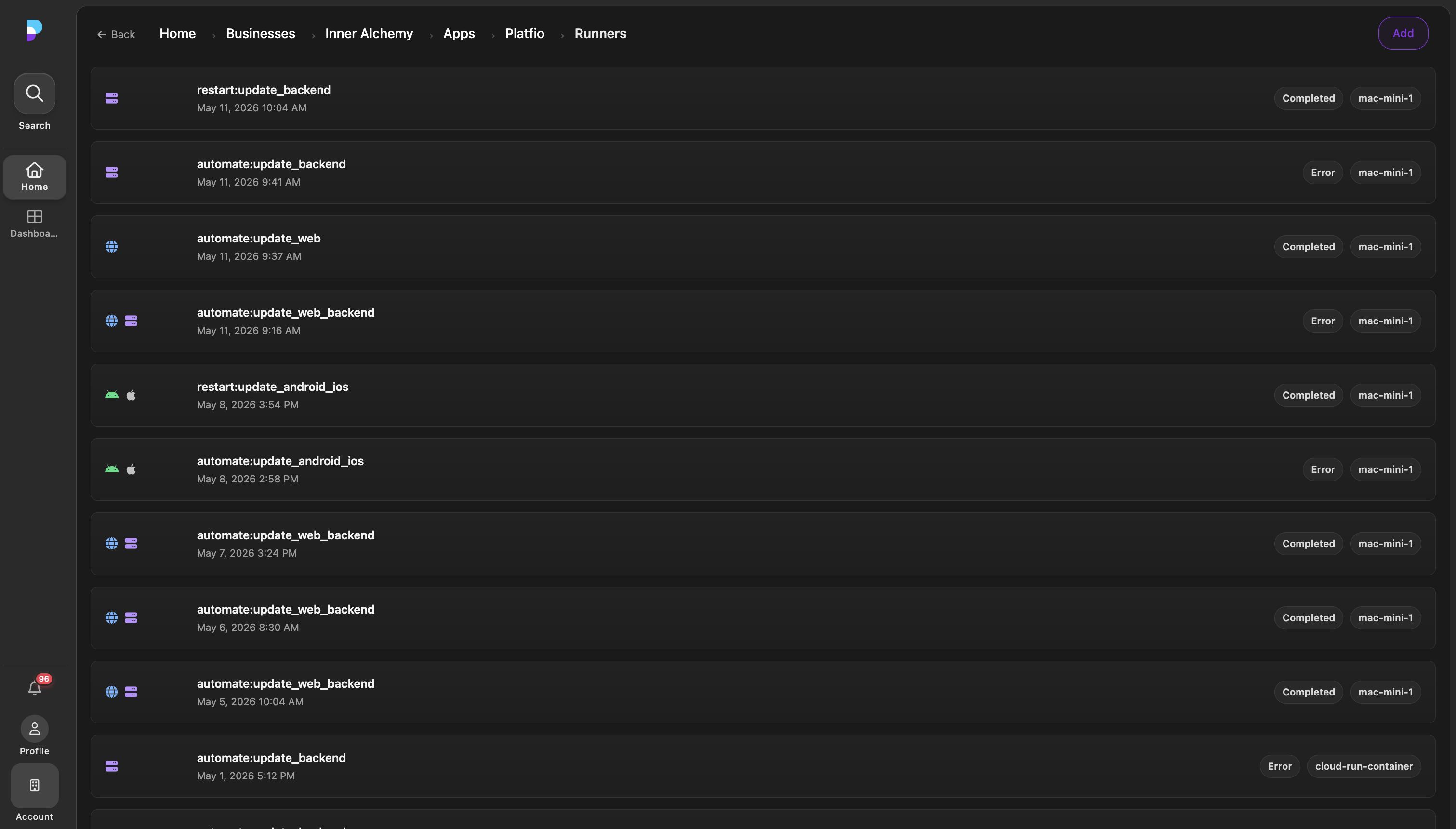
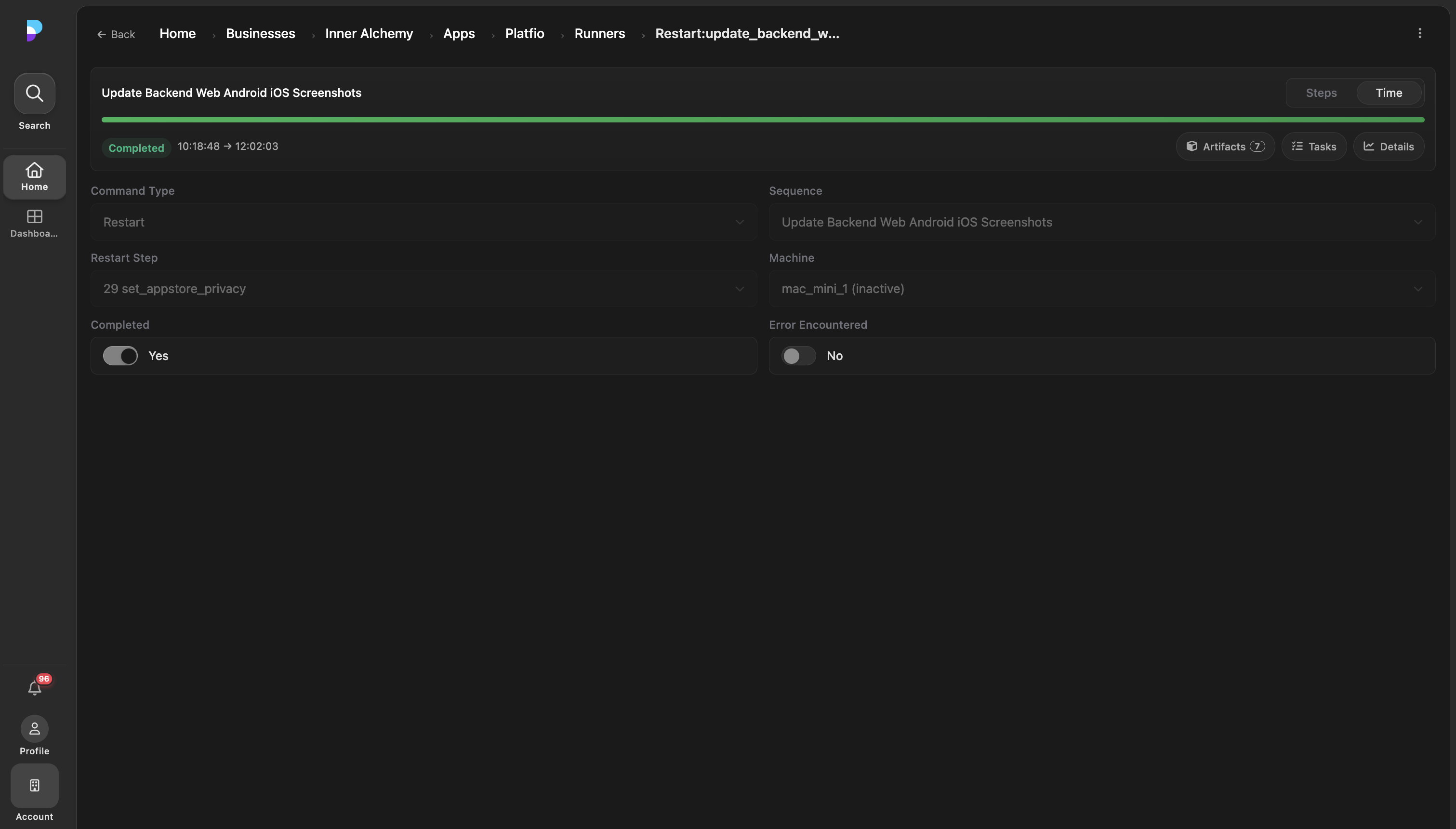
The runner then executes a sequence of commands. Those commands prepare the selected Platform Template release, merge source changes, inject environment values, update the web app and backend, and eventually use Fastlane to build and submit Android and iOS packages.
flowchart TD
  Start["Start runner"]
  Prepare["Prepare template"]
  Env["Apply environment values"]
  Merge["Merge source changes"]
  Backend["Update backend"]
  Web["Deploy web app"]
  Android["Build and submit Android via Fastlane"]
  IOS["Build and submit iOS via Fastlane"]
  Done["Runner complete"]

  Start --> Prepare --> Env --> Merge --> Backend --> Web
  Web --> Android --> Done
  Web --> IOS --> Done
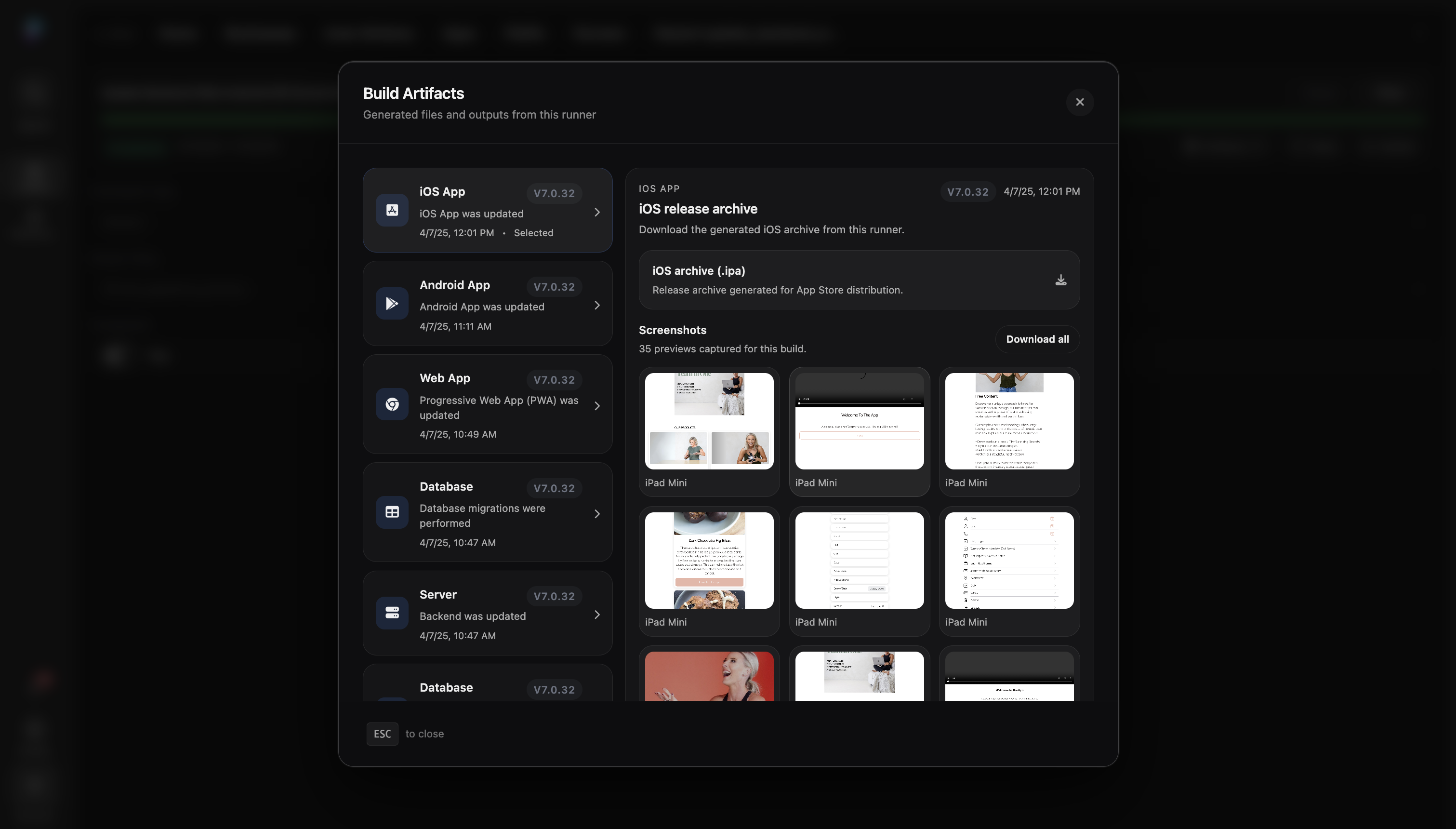
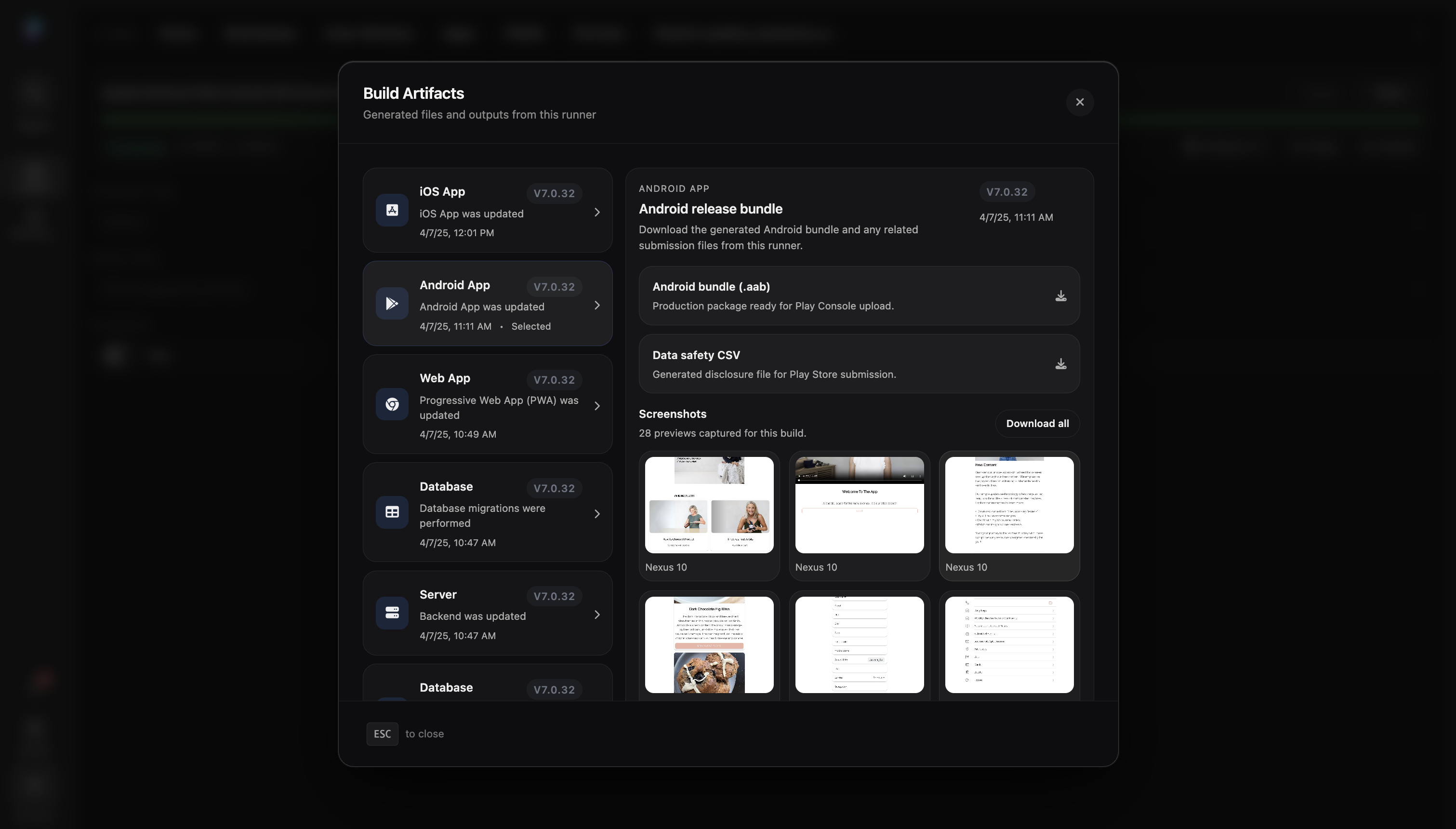
The important detail is that the runner is not a black box. As it progresses, each command creates logs. Certain commands also create build records, and those builds contain the artifacts that can be inspected and accessed later.
Artifacts are part of the product surface. They make deployment understandable after the fact. A deployment manager should be able to answer: which Platform Template release was deployed, what was built, which command produced it, which environment values were used, which package was uploaded, which logs explain a failure, and which manual task blocked the sequence.
flowchart TD
  App["App"]
  Runner["Runner"]
  TemplateRelease["Platform Template release"]
  Sequence["Command sequence"]
  Command["Command completes"]
  Log["Log entry"]
  Build["Build record"]
  Artifacts["Artifacts"]
  Packages["AAB / IPA / web bundle"]
  Evidence["Inspectable deployment record"]

  App --> Runner
  TemplateRelease --> Runner
  Runner --> Sequence --> Command
  Command --> Log --> Evidence
  Command --> Build --> Artifacts --> Packages --> Evidence
Runner lifecycle and failure recovery
The runner model became more valuable once failures stopped being exceptional.
In a recurring deployment system, a failure was not a crisis by itself. The crisis was a failure that left no durable state. A hidden CI job could fail with logs in one place, artifacts in another, credentials in a third, and the required human action living in someone’s head.
The runner had to make the state of the deployment visible:
- Create an app-scoped runner record.
- Select the correct execution environment for the target channel.
- Prepare the Platform Template release.
- Apply app, business, agency, and environment-specific values.
- Execute commands in order.
- Attach logs, build records, screenshots, and packages to the run.
- Pause into a task when the next step required a person.
- Resume the sequence after the manual step was completed.
The most important recovery decision was to make partial success useful. If a runner produced an AAB or IPA and then hit a store submission problem, that artifact still had value. The operator should not need to rerun everything just because the last mile failed.
| Failure mode | Bad system behaviour | Runner behaviour |
|---|---|---|
| Store API unavailable | Whole deployment fails without a handoff path | Preserve artifact and create manual upload task |
| App Store metadata issue | Engineer has to reconstruct context | Keep logs, package, screenshots, and blocked command together |
| Older mobile binary still in the field | Backend deploy breaks existing users | Gate sensitive behaviour by channel, tenant, and app version |
| Wrong execution environment | Build fails late after wasting time | Assign runners based on channel and tooling needs |
The automation rate improved because the system learned which failures were true engineering failures, which were missing state, and which were unavoidable human gates. Those are different problems. Treating them the same makes the platform harder to improve.
The manual gaps
The awkward truth is that not every deployment step has an API.
Some operations can be fully automated. Some can be automated after the right account and credentials exist. Others, such as creating a new application in parts of the Play Store flow, may require a staff member to perform a manual task.
Platfio models those gaps explicitly.
Instead of pretending the pipeline is fully automated, the sequence can pause and create a task. That task is assigned to a staff member with the context needed to complete it. Once the task is marked complete, the runner continues.
Manual takeover is part of that model.
If the Android path produces an AAB but a Play Store API step is blocked, the platform can expose the downloadable artifact and assign a staff member to upload it through the Play Console. If the App Store upload API is down or Fastlane cannot complete the submission, the runner still leaves an IPA behind. A team member can take over on the assigned Mac Mini in the build cluster and upload the IPA manually through Transporter.
The important detail is that manual does not mean invisible. The deployment record still knows which artifact was produced, which automated step failed, who took over, what action was required, and when the sequence could safely continue.
flowchart LR
  App["App"]
  Runner["Runner"]
  Store["Store platform"]
  Task["Manual task"]
  Staff["Staff member"]

  App -->|"Start deployment"| Runner
  Runner -->|"Attempt automated step"| Store
  Store -->|"No API available"| Runner
  Runner -->|"Create task with deployment context"| Task
  Task -->|"Assign manual work"| Staff
  Staff -->|"Complete required action"| Store
  Staff -->|"Mark complete"| Task
  Task -->|"Resume sequence"| Runner
  Runner -->|"Continue deployment"| Store
This is the difference between a brittle automation script and a deployment operating system.
A brittle script fails when reality requires a person. A deployment system knows when to pause, preserve context, assign work, and continue without losing the thread.
How the system evolved
The first instinct with CI/CD is to automate as much as possible and hide the ugly parts.
That was not enough here. The ugly parts were part of the product.
The system evolved through a few hard tradeoffs:
| Tradeoff | Tempting answer | Why it did not hold | Product answer |
|---|---|---|---|
| One project per app vs shared platform release | Create isolated CI for every app | Too much cost, setup, and operational drift across the app estate | App-scoped runners against a shared Platform Template release |
| Full automation vs honest manual gates | Pretend every step can be automated | Store platforms and account setup still have human-only gaps | First-class manual tasks with artifacts and resume state |
| Generic CI logs vs product records | Keep logs in the CI provider | Agencies and operators need deployment evidence inside the app context | Runner, command, build, log, and artifact records |
| One release moment vs staggered channels | Ship web, Android, and iOS as if they land together | App review, staged rollout, and PWA cache timing disagree | Version-aware feature controls and compatibility rules |
That evolution is why the runner is a product object rather than just a background job. It gives the agency, support team, and engineering team the same source of truth when a release goes sideways.
The real design constraint
The hard part of multitenant CI/CD is not running Fastlane. It is protecting every customer app from every other customer app, every release from store timing, and every operator from hidden state.
Platfio’s deployment system had to preserve a few principles:
- Agency, business, app, and store-account ownership must stay explicit.
- Runners must execute in the environment required by the build.
- Every command should leave inspectable artifacts or logs.
- Manual work should be modelled as first-class tasks, not tribal knowledge.
- Web, Android, and iOS releases must tolerate staggered adoption.
- Product features must be controllable by version when compatibility is sensitive.
flowchart TD
  Ownership["Explicit ownership"]
  Runners["Environment-aware runners"]
  Artifacts["Inspectable artifacts"]
  Manual["Manual task gates"]
  Compatibility["Backwards compatibility"]
  Versioning["Version-aware feature control"]
  Reliable["Repeatable multichannel releases"]

  Ownership --> Reliable
  Runners --> Reliable
  Artifacts --> Reliable
  Manual --> Reliable
  Compatibility --> Reliable
  Versioning --> Reliable
That is the useful framing: deployment is not the final technical step after the product has been built. For a platform like Platfio, deployment is part of the product.
The customer experience depends on it. The agency operating model depends on it. The engineering team depends on it. And the only way it scales is if the system is honest about the messy parts: store delays, old app versions, platform-specific build requirements, missing APIs, and the need for humans to occasionally step into the loop.